
How Workflow Automation Helps Growing Businesses Reduce Operational Bottlenecks
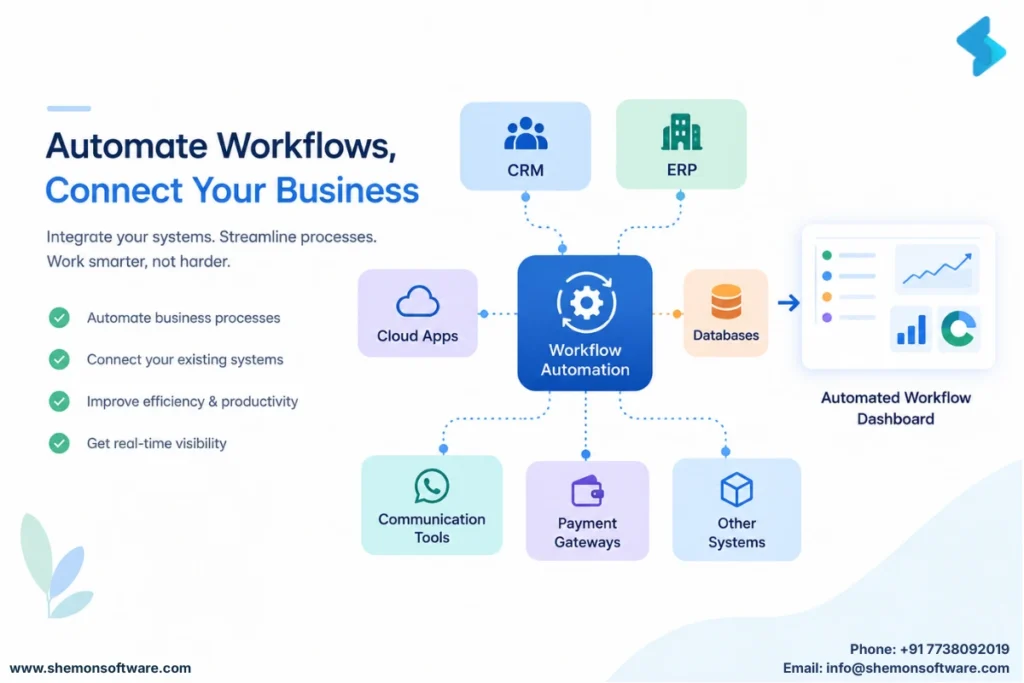
Growing businesses often reach a point where the team is working harder, but operations are not moving faster. Approvals get stuck, customer requests need manual follow-ups, data is entered more than once, and employees spend valuable time coordinating routine tasks. These bottlenecks become more visible as teams, customers, and processes grow.
For businesses in India, workflow automation software can help replace fragmented, repetitive processes with structured digital workflows. Instead of relying on spreadsheets, emails, messages, and manual reminders, businesses can create processes that automatically move work to the right person at the right time.
This guide explains how workflow automation reduces operational bottlenecks, where businesses can apply it, how to implement it effectively, and what mistakes to avoid.
Quick Summary
Workflow automation connects tasks, people, approvals, and systems into a structured process. It can reduce repetitive work, improve visibility, speed up approvals, and make accountability clearer. The key is to automate processes that are repetitive, rules-based, and measurable-not simply automate everything.
Why do growing businesses develop operational bottlenecks?
As businesses grow, informal processes that once worked become difficult to manage. More employees mean more handoffs, more customers create more requests, and additional tools create more data silos.
Common bottlenecks include:
- Manual data entry and duplication
- Delayed approvals
- Unclear task ownership
- Follow-ups handled through email or chat
- Limited visibility into work status
McKinsey research notes that small and midsize businesses generally have lower labour productivity than larger companies, making process improvement particularly important as they scale.
What Are the Common Workflow Automation Use Cases?
| Department | Example workflow |
|---|---|
| Sales | Lead assignment and follow-ups |
| HR | Employee onboarding and leave approvals |
| Recruitment | Candidate screening and interview workflows |
| Finance | Invoice and expense approvals |
| Customer Support | Ticket routing and escalation |
| Operations | Task assignment and status tracking |
| Marketing | Lead nurturing and campaign workflows |
| Management | Approval and reporting workflows |
How does workflow automation reduce bottlenecks?
Workflow automation software creates predefined rules for how work moves from one stage to another. When an action is completed, the next step can be triggered automatically, reducing unnecessary coordination.
For example, when a sales enquiry arrives, the system can assign it to the appropriate salesperson, create a follow-up task, update the CRM, and notify the relevant team without requiring several manual actions.
The result is a more predictable process with fewer delays and clearer accountability.
| Manual Process | Automated Workflow |
|---|---|
| Employees send reminders manually | System triggers reminders automatically |
| Approvals happen through email | Digital approval workflow |
| Employees enter data repeatedly | Information flows between connected systems |
| Status is tracked manually | Real-time workflow dashboards |
| Tasks depend on individual memory | Rules trigger the next action |
Which business processes are best suited for automation?
The best candidates are processes that happen frequently, follow predictable rules, involve multiple handoffs, or require repeated data entry.
Common examples include:
- Employee onboarding
- Lead assignment and follow-ups
- Invoice approvals
- Purchase requests
- Recruitment stages
- Customer support escalation
- Leave and expense approvals
- Order processing
Modern workflow automation solutions India can connect these processes across departments rather than treating each task as an isolated activity.

How should a business implement workflow automation?
Start with the process, not the technology. Map the current workflow, identify delays, and measure the time spent on repetitive activities.
A practical implementation approach is:
- Map the existing process: Document every step, handoff, approval, and exception.
- Identify the bottleneck: Find the stage creating the greatest delay or repetitive effort.
- Set a measurable goal: Track cycle time, errors, response time, or completion rates.
- Automate selectively: Use workflow automation tools where rules and triggers are clear.
- Monitor results: Use dashboards to identify further improvements.
What Is the Difference Between Workflow Automation and Business Process Automation?
- Workflow automation focuses on automating the movement of tasks, information and approvals through a defined workflow.
- Business process automation is broader and can involve automating an entire business process across multiple systems and departments.
What mistakes should businesses avoid?
Automation does not automatically fix a poorly designed process. Businesses should avoid automating unnecessary steps or creating complex systems that employees cannot easily use.
Three common mistakes are:
- Automating a process before understanding it
- Choosing tools without considering existing systems
- Ignoring employees who actually use the workflow
Effective business workflow automation should simplify work, not add another layer of complexity.
What is the future of workflow automation?
Automation is moving beyond simple task triggers toward intelligent decision-making. AI can increasingly classify information, identify patterns, recommend actions, and route exceptions while people handle decisions requiring judgment.
This shift is also making workflow management software more connected to analytics, AI, CRM systems, communication tools, and business applications. The goal is becoming less about automating individual tasks and more about creating connected operating systems.

FAQs
It is the use of technology to automatically move tasks, information, approvals, and notifications through a predefined business process.
Automation can perform an individual task, while a workflow connects multiple tasks, people, rules, and systems into one process.
Yes. Smaller teams can benefit significantly when repetitive administrative work consumes limited employee time.
Not necessarily all of it. The best approach is usually to automate repetitive, rules-based activities while keeping human involvement for exceptions and decisions.
Look for flexibility, integration capabilities, visibility, scalability, ease of use, and the ability to adapt as business processes change.
Operational bottlenecks are often symptoms of disconnected processes rather than simply workload problems. Automated workflow software can help businesses create clearer handoffs, reduce repetitive work, improve visibility, and make processes easier to scale.
The right starting point is not choosing the most features. It is identifying where work slows down and designing a simpler process around that bottleneck. From there, workflow automation platforms, business process automation software, process automation software India, and workflow automation solutions can be evaluated based on the specific needs of the business.
Tags
Workflow automation software India
Business process automation software


