
Operations & Workflow Automation Integrations for Faster Business Processes
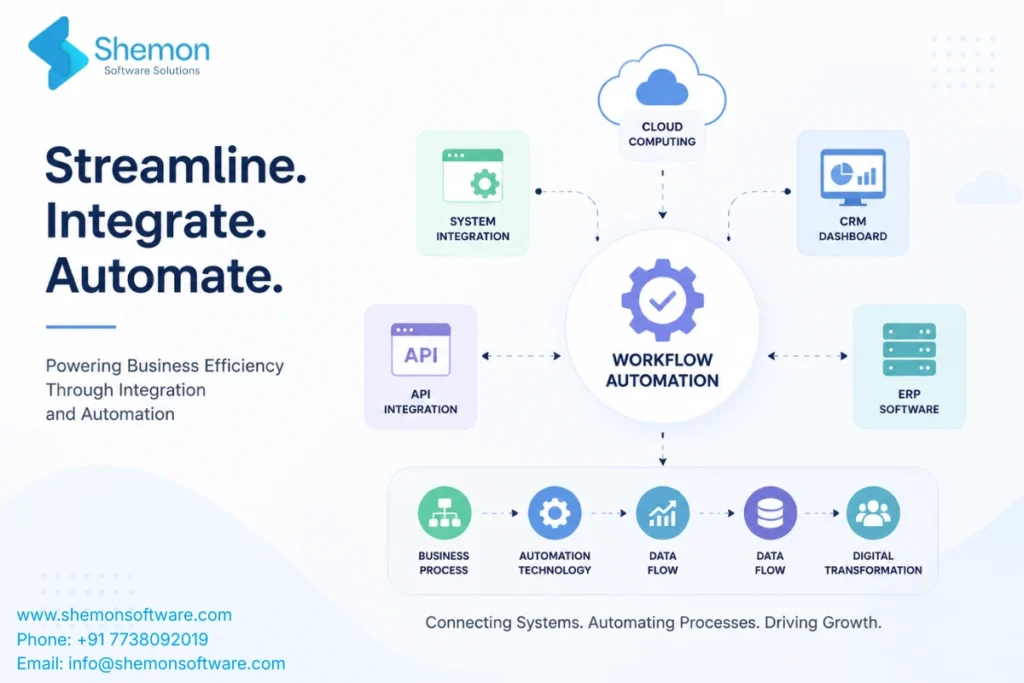
Businesses today rely on multiple software applications to manage sales, finance, customer service, HR, and operations. When these systems don’t communicate with each other, teams spend valuable time on repetitive manual work. Operations & Workflow Automation Integrations connect your existing software, automate repetitive tasks, reduce errors, and improve efficiency across your organisation. This guide explains how workflow automation works, its benefits, and how businesses can successfully implement it
What Manual Work Is Really Costing Your Business
Operating a growing company is like constantly running ten different applications simultaneously. Sales use one application, accounting uses another. Everything is disconnected, which means somebody needs to copy information manually, request approvals via email, and just hope that everything goes right. This is precisely what Operations & Workflow Automation Integrations help with. Instead of having your team go through the same manual process every day, your software is interconnected and does everything automatically without needing any clicks.
Why Do Manual Processes Hold Businesses Back?
Manual processes create a drag on productivity because each additional step means another delay, a possibility for human errors, and wasting time that can actually be used to do something useful. Having to manually input a sales lead in three separate applications or requesting five separate approvals of an invoice via email turns a pleasant challenge into a nightmare.
Businesses rarely even understand how much they lose until measuring this cost. The most common symptoms include:
- Employees spending hours weekly on repetitive data entry
- Approvals stuck in someone’s inbox for days
- Reports that take a full day to compile by hand
- Customer data scattered over spreadsheets, emails and applications
When talking about business process automation, it means that you will need to gather all the scattered bits of customer data to have it available and accessible in one place.
Industries That Benefit Most from Operations & Workflow Automation Integrations
Almost every industry relies on multiple software systems to manage daily operations. When these systems work together, businesses can reduce manual effort, improve productivity, and make faster decisions. Here are some of the industries that benefit the most from workflow automation and system integrations:
- Healthcare
Hospitals, clinics, and healthcare providers can automate patient registration, appointment scheduling, billing, insurance verification, and medical record management. This reduces administrative work while improving patient care and compliance.
- Manufacturing
Manufacturers can connect ERP systems, inventory management, procurement, and production planning software to streamline operations, reduce delays, and improve supply chain visibility.
- Retail & E-commerce
Retail businesses can integrate inventory management, order processing, payment gateways, CRM, and shipping platforms to provide faster order fulfilment and better customer experiences.
- Finance & Accounting
Financial organisations can automate invoice approvals, expense management, payment processing, financial reporting, and compliance workflows, reducing manual errors and improving accuracy.
- Logistics & Supply Chain
Logistics companies can connect warehouse management, shipment tracking, transportation systems, and customer notifications to improve delivery efficiency and operational visibility.
What Exactly Do We Mean by Connected Workflows?
A connected workflow is simply a set of business tasks where different software tools share information automatically, so one action triggers the next without manual input. Think of it as building a bridge between apps that were never designed to talk to each other.
For example, when a customer fills out a form on your website, that data can instantly create a lead in your CRM, notify your sales team via chat, and schedule a follow-up call, all without a single person having to copy and paste. This is the core idea behind modern workflow automation solutions: fewer manual handoffs, faster action, and less room for mistakes.
Common Software We Integrate
Every business uses a different combination of software to manage its operations. Our workflow automation and integration solutions are designed to connect your existing systems, allowing data to move securely and automatically across your organisation.
We can integrate a wide range of business applications, including:
- CRM Platforms: Salesforce, HubSpot, Zoho CRM, Microsoft Dynamics 365
- ERP Systems: SAP, Oracle ERP, Odoo, Microsoft Dynamics ERP
- Accounting Software: QuickBooks, Xero, Tally
- Project Management Tools: Jira, Trello, Asana, Monday.com
- Communication Platforms: Slack, Microsoft Teams, Google Workspace
- E-commerce Platforms: Shopify, WooCommerce, Magento
- Cloud Storage: Google Drive, Dropbox, OneDrive
- HR & Payroll Systems: BambooHR, Zoho People, Workday
If your business uses custom software or industry-specific applications, we can develop secure API integrations that allow them to communicate seamlessly with your existing technology stack.
How Does the Integration Process Actually Work?
The process works by connecting your existing software through secure digital pathways that let data move between systems in real time. It sounds technical, but the outcome is simple: your tools finally work as one system instead of many disconnected pieces.
Here is what typically happens step by step:
- A business process is mapped out to understand every step and handoff
- The right tools are identified, whether it is your CRM, ERP, HR software, or accounting system
- API integration services are used to build secure connections between these tools
- Rules and triggers are set up, so actions happen automatically based on real events
- The system is tested thoroughly before going live
Nothing about this requires your team to learn complicated new software. The automation runs quietly in the background while your team keeps using the tools they already know.
Manual Process vs Automated Workflow
The impact of workflow automation becomes much clearer when comparing traditional manual processes with automated workflows.
| Manual Process | Automated Process |
|---|---|
| Manual Data Entry | Automatic Sync |
| Email Approvals | Instant Approval Workflow |
| Excel Reports | Live Dashboards |
| Duplicate Entries | Single Source of Truth |
| Human Errors | Automated Validation |
What Do You Gain From This?
Businesses that automate their workflows save time, reduce errors, and get clear visibility into what is happening across teams, all without adding extra headcount. The benefits go beyond just convenience.
- Time savings: Tasks that took hours now take minutes
- Fewer mistakes: Machines do not forget steps or make typos
- Better visibility: Managers can see real-time status instead of asking for updates
- Faster decisions: Data flows instantly instead of sitting in someone’s inbox
- Scalability: Growing teams do not need to hire just to handle more admin work
Since every business has different needs, custom workflow automation is often built around the exact steps your team already follows, rather than forcing you into a generic template. Many companies also add AI workflow automation on top, allowing systems to make smart decisions, like flagging unusual invoices or prioritising urgent tickets automatically.
How Can You Start Automating Your Operations?
The best way to start is small: pick one repetitive, painful process, automate it, measure the results, then expand from there. Trying to automate everything at once usually backfires.
A practical approach looks like this:
- List every tool your team uses daily
- Identify the most repetitive or error-prone task
- Automate that single process first
- Track the time and errors saved
- Gradually connect more systems through enterprise software integration
This step-by-step method builds confidence across your team and shows real results early, instead of asking everyone to trust a big change all at once.
Why Businesses Choose Shemon for This Work
We at Shemon Software Solutions know that it is wrong to force companies to use products that are only partially suitable for their business processes. We’ve helped companies in health care, retail, manufacturing, and education move to better business processes without relying on disconnected spreadsheets and applications.
We can do anything from integrating CRM and ERP systems to creating business workflow management solutions, all based on your particular business approval flow, organisational structure, and reporting requirements. With us, you will get a faster process, fewer errors, and dashboards that will finally show you real business statistics.
FAQs
No. Actually, small and medium-sized businesses need it more because automation helps them save people's working time for other important tasks.
No. Workflow automation will help you get rid of routine operations and let your people make decisions and build relations instead.
Simple automations can show measurable time savings within a few weeks. Larger, custom workflow automation development projects may take a few months depending on complexity.
Usually not. Most integrations connect your current tools rather than replacing them.
Yes, in most cases. Integrations are built to connect your current tools like your CRM, accounting software, or project tracker, rather than requiring you to switch everything.
A well-built system includes checks and alerts, so errors get flagged instead of silently causing problems. This is why proper testing before launch matters so much.
Start with the task your team complains about most, or the one that takes the longest for the least valuable work. That single fix usually shows the fastest, most visible results.
The Takeaway Every Business Owner Needs
Disconnected tools and manual processes quietly drain your team’s time every single day. By connecting your systems and automating repetitive steps in between, your business runs faster and cleaner, with far fewer costly mistakes. The right integration strategy turns scattered tools into one smooth, reliable operation.
If your team is still copying data between apps or chasing approvals over email, it might be time for a better system. Reach out to Shemon Software for a discovery call and let us show you how connected workflows can transform how your business runs.
Tags
Operations & Workflow Automation Integrations
Business process automation


